Pet ID QR Code Generator
Create a Pet ID profile and QR code for your pet’s collar. If your pet gets lost, anyone can scan it to view your contact details and help bring them home. Update the information anytime without replacing the QR code.
Create a Pet ID QR Code

Pet ID Tag QR Code for Your Dog Collars and Cat Tags
Create your Pet ID Tag QR Code today and help protect your pet. Share vital pet information and your contact details with just a scan, making it easier for others to help bring your lost pet home quickly and safely.


What Is a Pet ID Tag QR Code?
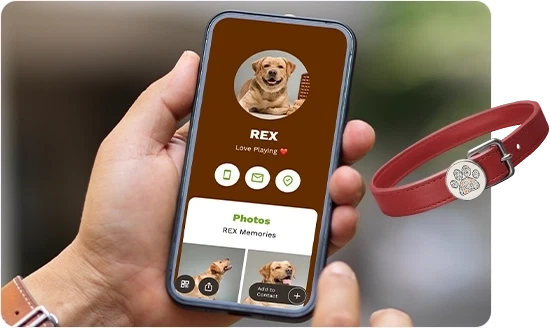
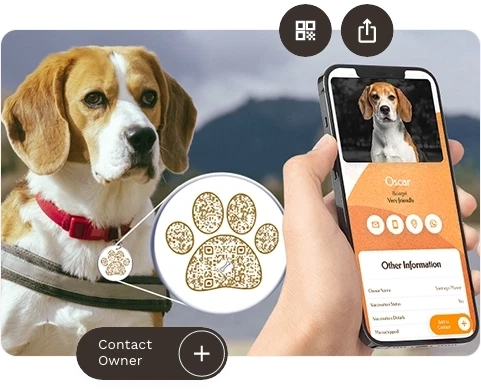
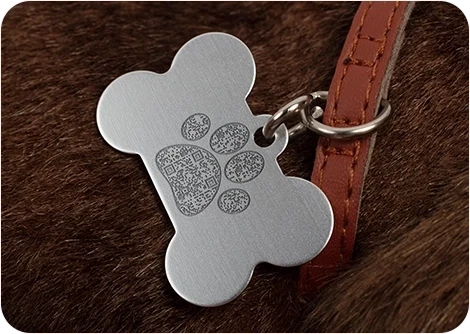
A Pet ID Tag, also known as a QR code dog tag or cat tag, is a smart way to help protect your pet. When someone scans the QR code, they’re instantly redirected to a customizable display page containing crucial information about your pet, including vaccination status, allergies, temperament, medical history, vet details, and your contact details.
This feature is invaluable if your pet ever goes missing. QRCodeChimp enhances this with alert emails that notify you whenever your pet’s QR code is scanned. The email includes an IP link that provides an approximate location of the scanning device.
An estimated one in three pets will become lost at some point in their lifetime, according to American Humane Society. Don’t take chances with your pet’s safety. Protect your furry friend with a QR code pet ID tag. Attach the QR code to a physical tag on their collar, and if they get lost, anyone can scan the code to contact you. Peace of mind is just a scan away.
How Does a Pet ID QR Code Work?
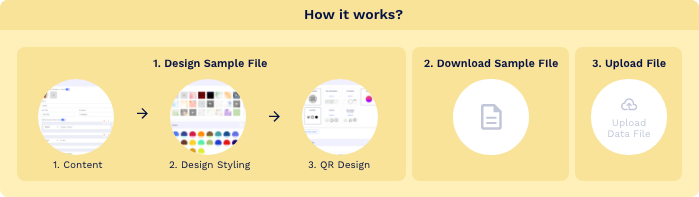
Here’s how a Pet tag QR code works:


How to Create a Pet ID Tag QR Code

Create and Manage Pet ID QR Codes with QRCodeChimp
QRCodeChimp is the perfect solution for creating and managing your dog tags and cat tags. Let’s look at the key features of QRCodeChimp.


Benefits of a Dog Tag QR Code
Opting for a QR code dog tag offers a multitude of benefits, including:
Easy Pet Identification
If your pet gets lost, anyone who finds them can easily scan the QR code on their pet tag to access important information, such as the pet’s name, owner’s contact details, and medical information.
Instant Contact Information
The QR code provides instant access to your contact details, making it easier and faster for someone to reach you if they find your pet.
Updatable Information
Unlike traditional pet tags, where information is static, you can update your contact details or any other important information through the platform without needing to change the physical tag or QR code.
Comprehensive Pet Profile
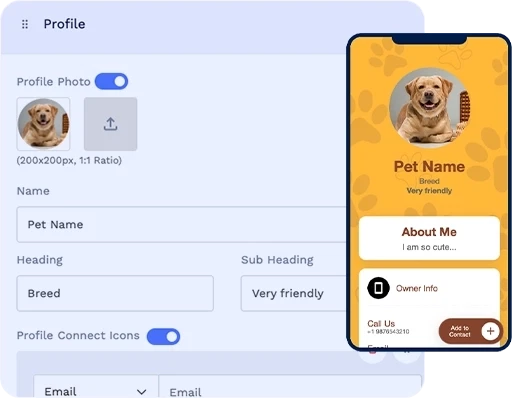
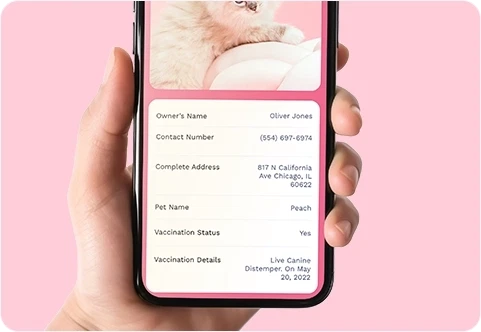
You can create a detailed and customizable profile for your pet, including emergency contact numbers, medical conditions, vaccination status, vet details, and other relevant information that may be helpful in an emergency.
Customizable Tags
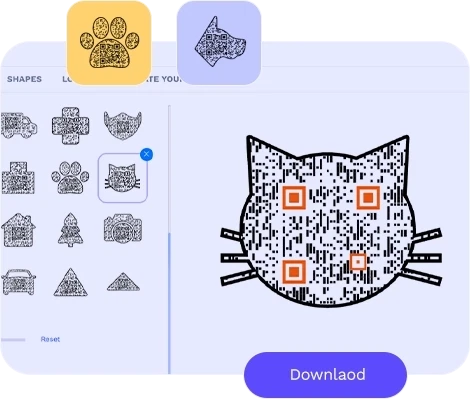
QRCodeChimp allows you to customize the Pet ID display page and QR code design, adding a unique and personal touch. You can then print or attach the downloaded QR code to a physical tag of your choice.
Global Reach
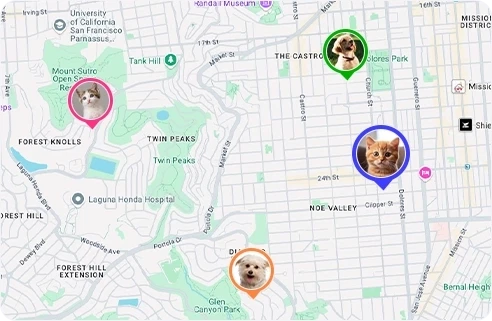
The Pet ID QR code can be scanned worldwide using most modern smartphones with QR scanning capability and an internet connection, making it easier for people to contact you no matter where they find your pet.
Convenient for Multi-pet Owners
If you have multiple pets, you can create a separate profile and QR code for each pet and manage their information through one digital platform. This makes it easier to keep each pet’s details accurate and up to date.
How to Make Your Pet ID QR Code Easy to Scan
Here’s how to make your QR code pet tag easily scannable:
Make your QR code easy to scan
Make sure your Pet ID QR code is easy to scan. As a general guideline, print it at least 0.8 × 0.8 inches, though the ideal size may vary based on the design and tag material.
Use strong contrast, leave enough clear space around the code, and test the finished tag on different iOS and Android devices before use.


Decorate your QR code
Make your Pet ID QR code unique and noticeable. Use shapes, colors, your pet’s image, and other design features to decorate the QR code without reducing contrast or making it difficult to scan.
Make your Pet ID QR Code actionable
Add a call to action to your QR code to make it actionable. You can use QRCodeChimp stickers with CTAs on your pet tags.

Where to Use a Pet ID Tag QR Code
Here are some places to use a Pet ID tag QR code:


Frequently Asked Questions
- How do I create a Pet ID Tag QR Code?
- Can I use the Pet Tag ID with NFC?
- How can users contact the pet owner using a Pet ID tag QR code?
- Is a QR code dog tag collar better than a traditional dog tag?
- What information can I include on a Pet ID display page?
- Can I change the information of a QR code dog tag?
- Should I put my dog's name on their tag?
- Does QRCodeChimp provide the physical pet tag?
- Does a Pet ID QR code track my pet’s live location?
Frequently Asked Questions
How do I create a Pet ID Tag QR Code?
Follow these steps to create a QR code dog tag:
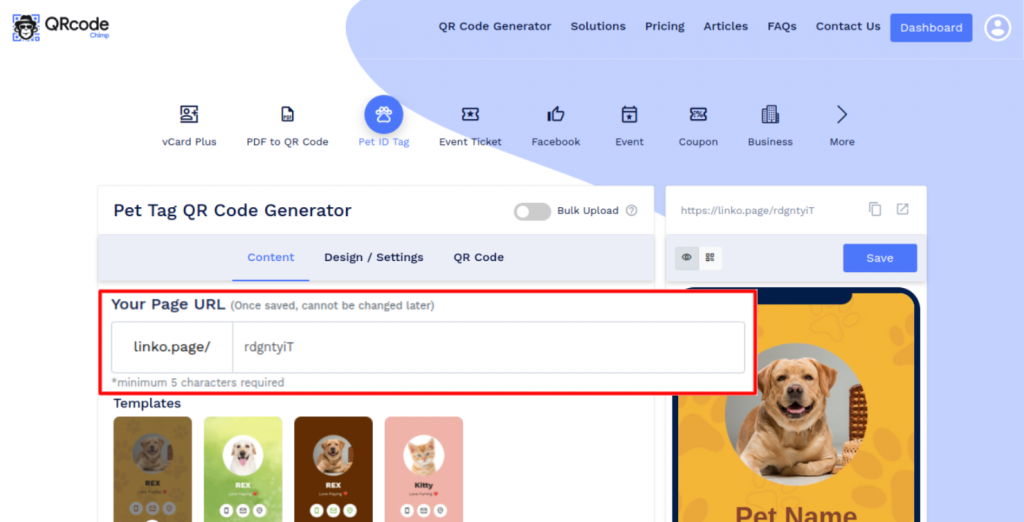
Step 1: Customize Your Page URL (Optional)
Customize the Pet Id Tag Page URL to your preference (optional).
Note: Once saved, you cannot change it.
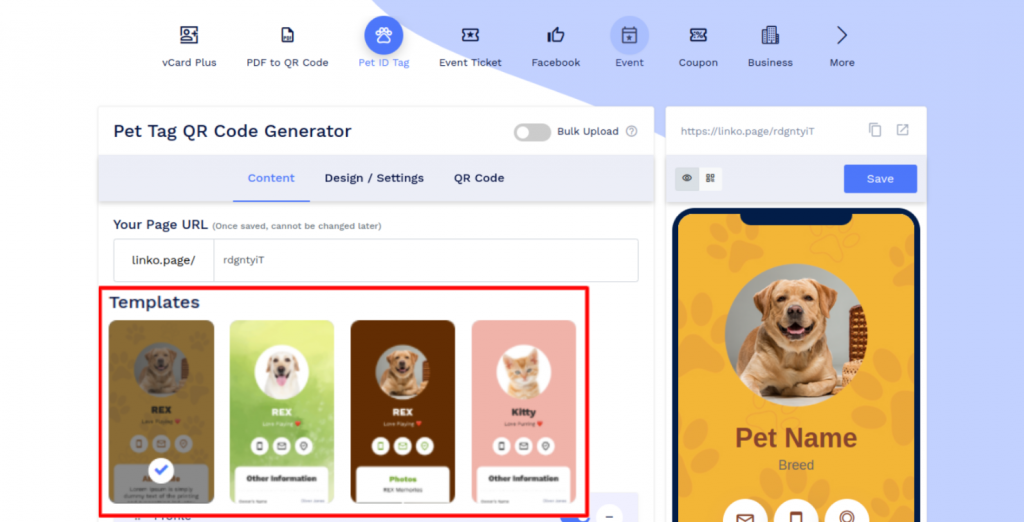
Step 2: Select the Template
Select the template for your Pet Id Tag.
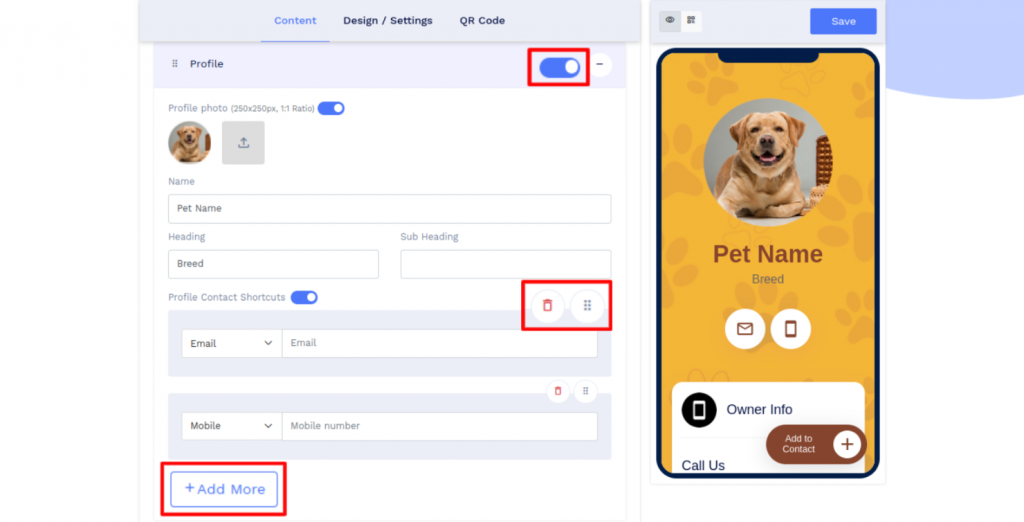
Step 3: Enter Contact Details, Pet's Information
Enter your contact details and the pet's information in the components of the Content tab. You can also add additional sub-components by clicking on the 'Add' button of the respective 'Component.'
Note: You can choose to hide/delete/move the components to your preference.
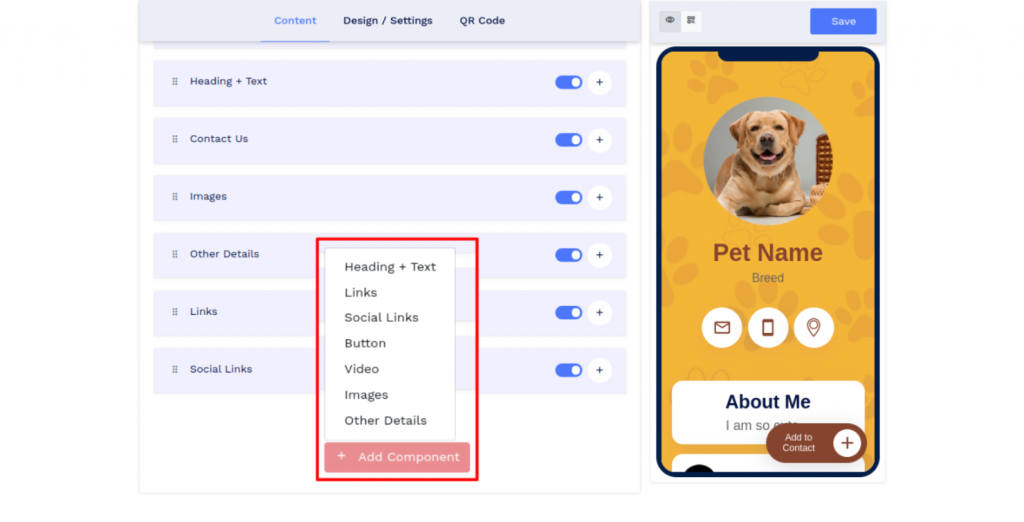
Step 4: Add Additional Components (Optional)
Click on 'Add Component' to add additional sections such as a button, video, etc. (optional).
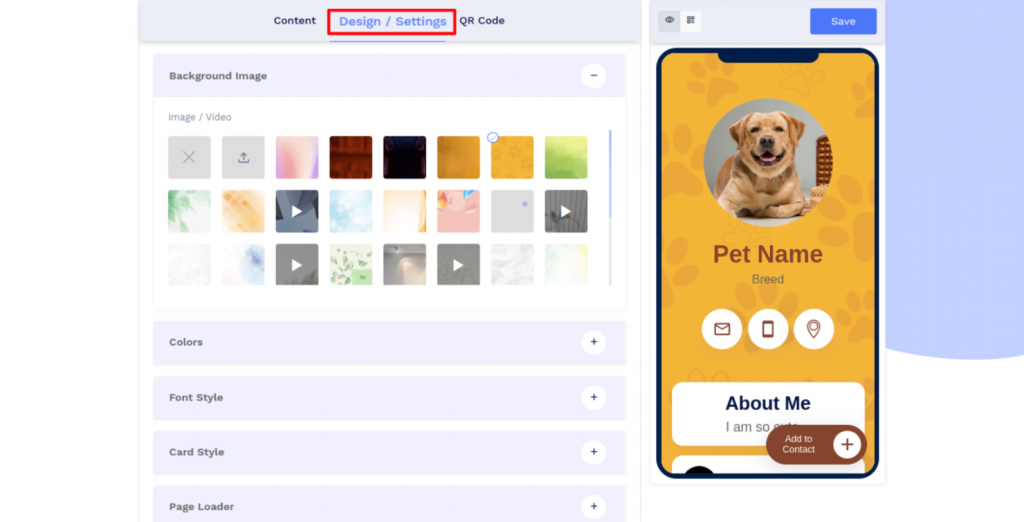
Step 5: Customize the Page Design
Click on the 'Design/Settings' tab to customize the page design with background image/video, colors, font style, card style, and page loader.
Note: You can also set your emails to receive email notifications of scans.
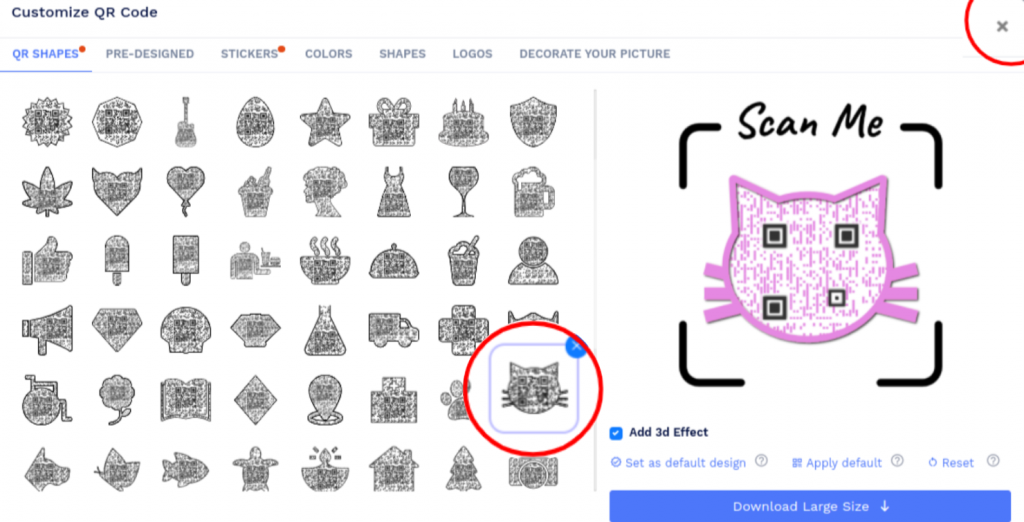
Step 6: Customize Your QR Code Design
Click on the 'QR Code' tab to customize your QR Code design (ex: adding shape, color, and sticker).
Note: Click on the 'x' icon of the 'Customize QR Code' popup to save changes.
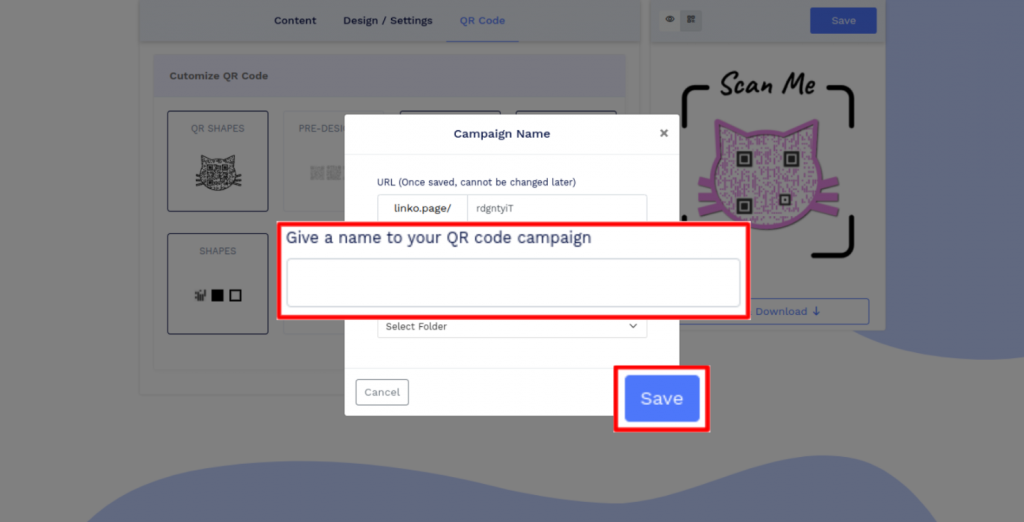
Step 7: Save and Download
Click on the 'Save' button. Enter the QR Code name, edit the URL (optional), select folder (optional) and click on 'Save.'
Note: Make sure to scan your QR Code from different devices (iOS and Android) before printing for production.
Can I use the Pet Tag ID with NFC?
Yes, you can! Simply copy the URL (displayed above the side preview, just above the Save button) and write it onto your NFC tag. Once done, it will work seamlessly.
How can users contact the pet owner using a Pet ID tag QR code?
People who find a lost pet can scan the QR code pet tag on the pet’s collar. They’ll get redirected to the Pet ID display page, where they can find information about the pet and contact the pet owner.
Is a QR code dog tag collar better than a traditional dog tag?
A QR code pet tag offers more flexibility than a traditional engraved tag. It can link to a detailed Pet ID profile containing the owner’s contact details, medical information, vaccination status, and other important information. A QR code pet tag and a traditional engraved tag can be used together.
Using both provides immediate visible identification along with access to a more comprehensive and updatable pet profile.
What information can I include on a Pet ID display page?
A Pet ID display page is customizable. It can contain your pet’s information, including their name, vaccination status, allergies, temperament, medical history, emergency contact numbers, and vet details.
You can also include the owner’s name, address, contact details, images, links, buttons, and other information using customizable page components.
Can I change the information of a QR code dog tag?
A dog tag or cat tag QR code is dynamic, so you can change the contents of the Pet ID display page without reprinting the QR code.
If your phone number, address, pet information, or other details change, you can update the profile while continuing to use the same QR code.
Should I put my dog's name on their tag?
Including your dog’s name can help a finder address them, but it is optional.
Prioritize a current phone number and other essential contact information. You can include your pet’s name and more detailed information on the Pet ID display page.
Does QRCodeChimp provide the physical pet tag?
No. QRCodeChimp lets you create the digital Pet ID profile and download its QR code.
You need to print or attach the QR code to a physical pet tag purchased separately. Make sure the finished tag is securely attached, durable, weather-resistant, and tested for reliable scanning.
Does a Pet ID QR code track my pet’s live location?
No. A Pet ID QR code is not a GPS tracker and does not continuously track your pet’s movements.
When someone scans the code, QRCodeChimp can record approximate IP-based location information. You can also enable precise location tracking, which asks the person scanning the code for permission to share their GPS location.
If permission is granted, the scan’s GPS coordinates are recorded. If permission is denied, the QR code still opens, and only approximate IP-based location is recorded.
Hear What Our Customers Have to Say About QRCodeChimp Solutions!