Meeting QR Code Generator
Turn any online meeting link into a QR code for quick, easy access. Works with Microsoft Teams, Webex, GoTo Meeting, and other meeting platforms.


Meeting QR Code: QR Code Generator for Meeting
Seamlessly share your meeting URL and make it easier for participants to access your online meeting.


What Is a Meeting QR Code?
A meeting QR code helps you share your meeting URL and increase participation. Instead of copying and pasting the meeting link, you can share the meeting QR code.
People scan the QR code to open the meeting link on their device. Any sign-in, passcode, waiting room, or other access requirements set by the meeting platform still apply.
A Meeting QR Code is useful for online meetings, virtual sessions, webinars, classes, training sessions, and hybrid events where you want to make a meeting link easier to access.
Benefits of a Meeting QR Code
If you conduct online meetings regularly, a meeting QR code can be helpful. Here's why you should use a meeting QR code:
- Make meeting links easier to access: Participants can scan the QR code instead of typing or copying and pasting a long meeting URL.
- Share your meeting URL across channels: Share your meeting QR code on presentation slides, invitations, agendas, brochures, handouts, posters, signage, emails, and other online or offline materials.
- Update the meeting URL without reprinting: With a dynamic Meeting QR Code, you can change the destination meeting URL while continuing to use the same printed or shared QR code.
- Track QR code scans: Use dynamic QR code analytics to understand when and where people are scanning your Meeting QR Code. QR code analytics measure scans, not confirmed meeting attendance.
- Customize the QR code for your brand: Add your logo, brand colors, shapes, stickers, and a clear call to action such as “Scan to Join Meeting.”
- Use it with different meeting platforms: Create a Meeting QR Code from a meeting link on Zoom, Google Meet, Microsoft Teams, Webex, GoTo Meeting, or another online meeting platform.

Create and Manage Meeting QR Codes with QRCodeChimp
QRCodeChimp's meeting QR code generator lets you create custom meeting QR codes. Here’s why you should use QRCodeChimp:


How Does a Meeting QR Code Work?
A meeting QR code simplifies the process of joining an online meeting. Here's how a meeting QR code works:


Who Should Use a Meeting QR Code?
Anyone who conducts meetings regularly should use a meeting QR code. These include:


How to Get More Scans on Your Meeting QR Code?
Event managers and online consultants who want to promote their webinars and virtual events should follow these best practices to get more scans on their meeting QR code:
Share it across channels
Share your meeting QR code across online and offline channels to reach more participants and get more scans.


Print the right size
If you plan to print your meeting QR code on offline media like newspapers and brochures, the QR size should be at least 0.8 x 0.8 inches for seamless scannability.
Make your Meeting QR Code visually appealing
Use unique shapes and colors to make your meeting QR code relatable and visually appealing. Also, add stickers with CTAs to your QR code to make it more actionable.


Create a dynamic Meeting QR Code
Always make a dynamic meeting QR code, so you can change the meeting URL without reprinting the QR code. You can also track the scans of a dynamic QR code.
Frequently Asked Questions
- How to create a Meeting QR Code?
- How to get a Skype Meeting URL to share?
- How to get a Zoom Meeting URL to share?
- How to get a Google Meet URL to share?
- Which meeting platforms does QRCodeChimp's meeting QR code generator support?
- Can I change the meeting URL after creating a meeting QR code?
- How can users join an online meeting using a meeting QR code?
- Can I use this Meeting QR Code Generator for Zoom or Google Meet?
- Can I create a QR code for a Microsoft Teams meeting?
- Can I change the meeting URL after creating a meeting QR code?
- Should I create a static or dynamic Meeting QR Code?
- Does scanning a Meeting QR Code automatically admit someone to the meeting?
- Can Meeting QR Code analytics track attendance?
- Where can I share a Meeting QR Code?
Frequently Asked Questions
How to create a Meeting QR Code?
Follow these steps to create a meeting QR code:
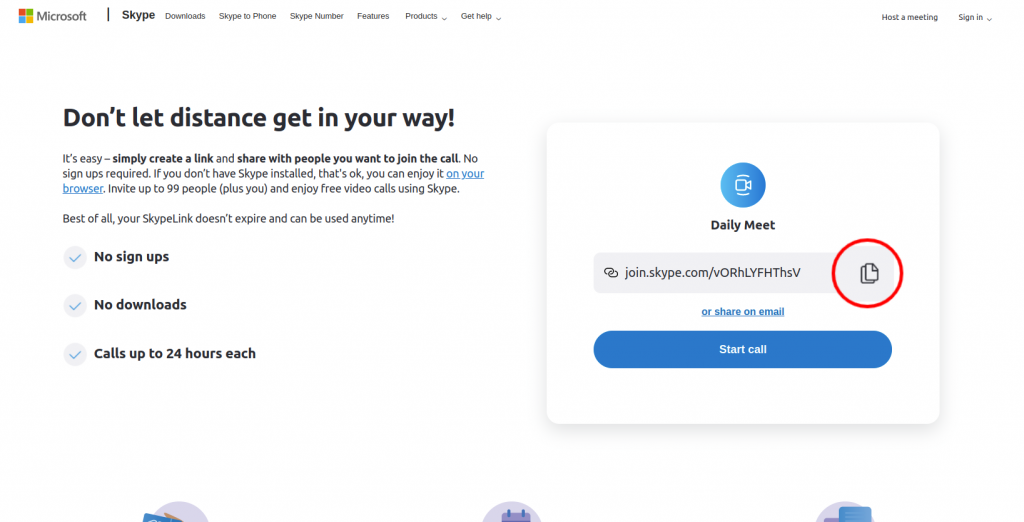
Step 1: Copy the Meeting Link
Copy the meeting URL from the platforms such as Skype, Zoom, and Google Meet.
Step 2: Paste the Copied Link
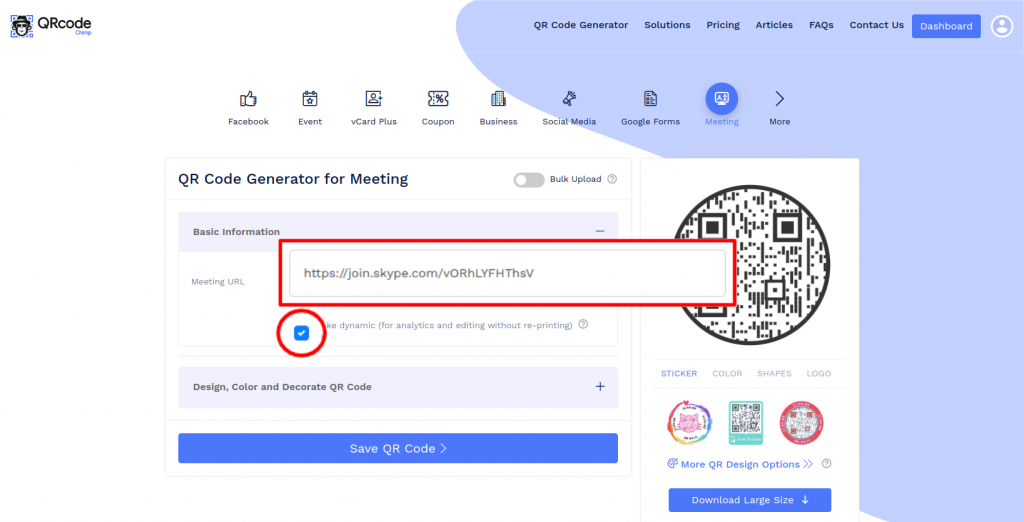
Paste the copied link in the 'Meeting URL' field of QR Code Generator for Meeting.
Note: Check the 'Make dynamic' box to track the scans and edit without reprinting.
Step 3: Design Your QR Code
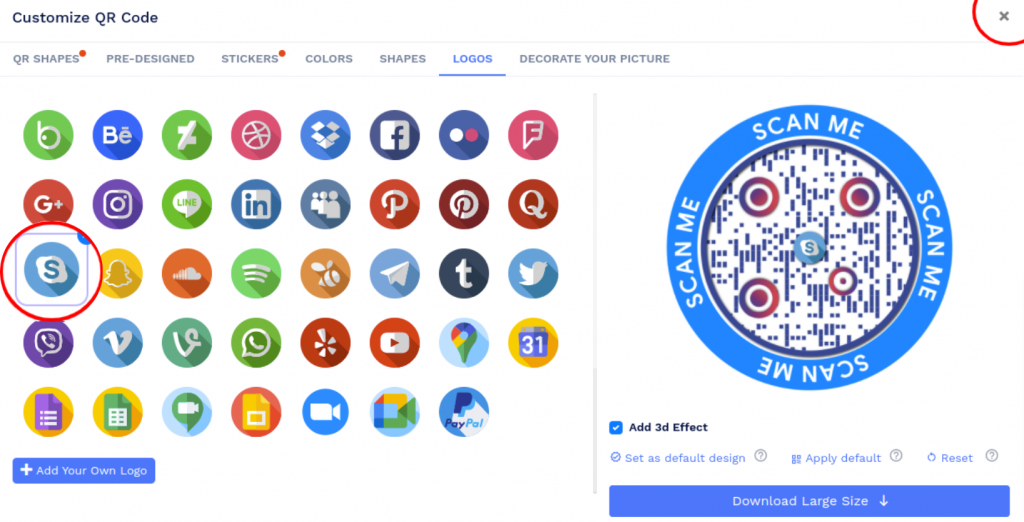
Click on 'Design Color and Decorate QR Code' to customize your QR Code design (ex: adding color, shape, sticker).
Note: Click on the 'x' icon of the 'Customize QR Code' popup to save changes.
Step 4: Save and Download
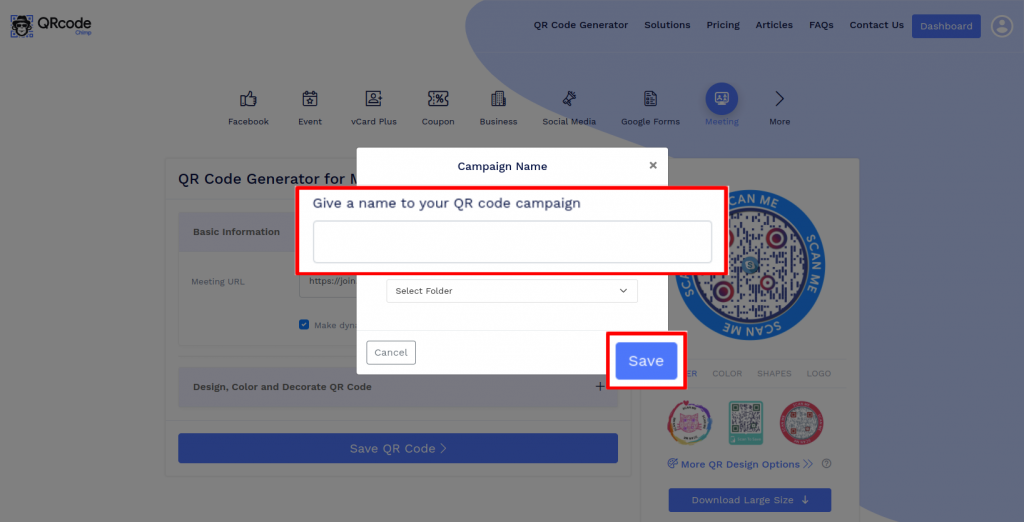
Save the QR Code by clicking on the 'Save QR Code' button, entering the QR name, and then clicking on 'Save.'
Note: Make sure to scan your QR Code from different devices (iOS and Android) before printing for production.
How to get a Skype Meeting URL to share?
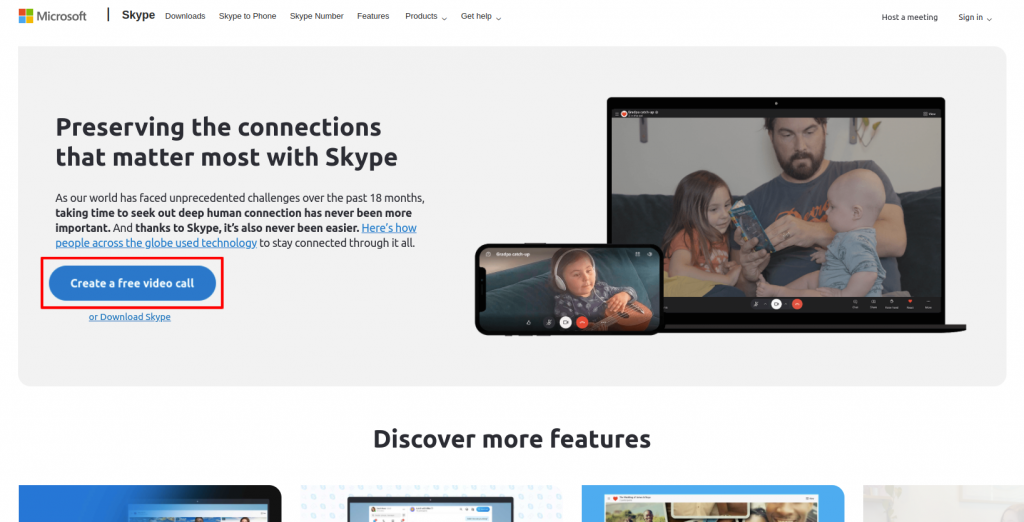
Step 1: Initiate a Free Video Call
Go to Skype and click on ‘Create a free video call.’
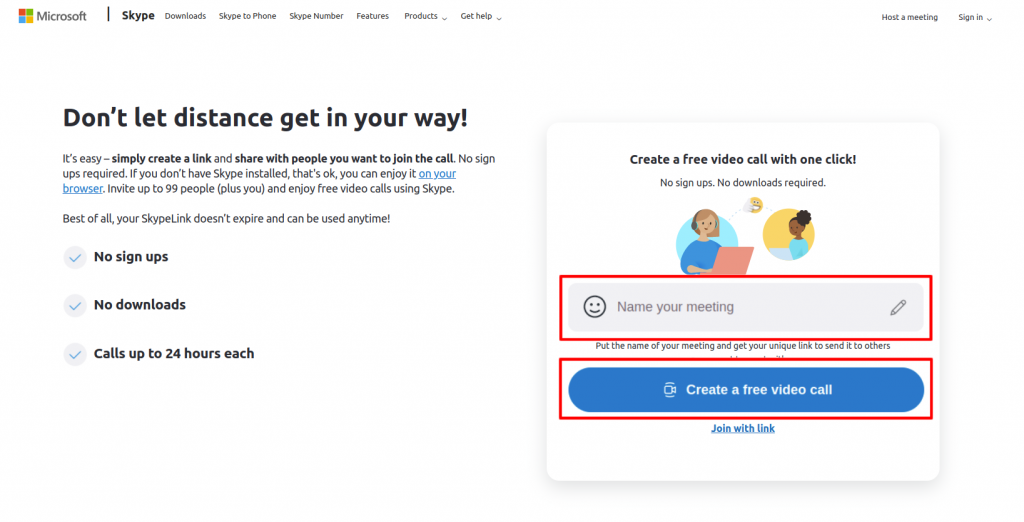
Step 2: Create a Free Video Call
Enter the name of your meeting and click on 'Create a free video call.'
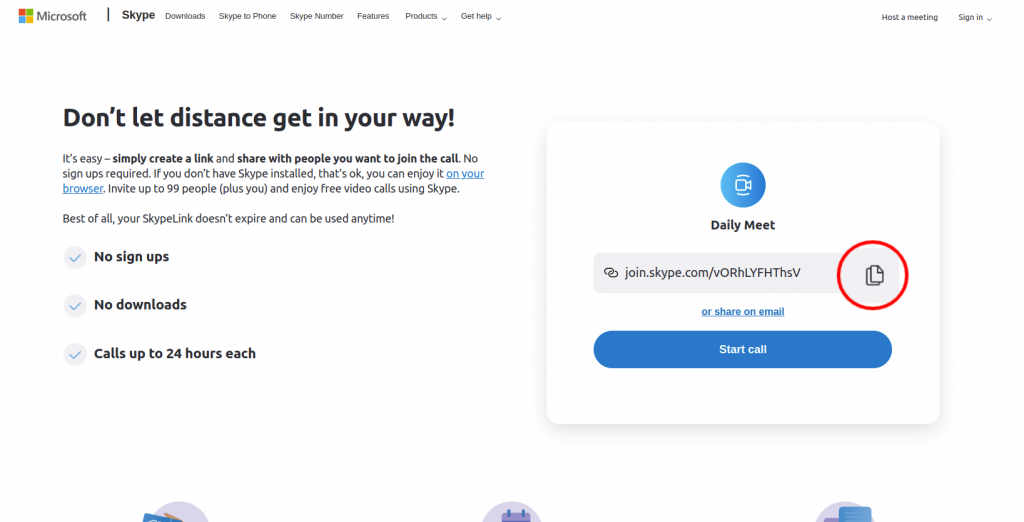
Step 3: Copy the Link
Click on 'Copy.'
How to get a Zoom Meeting URL to share?
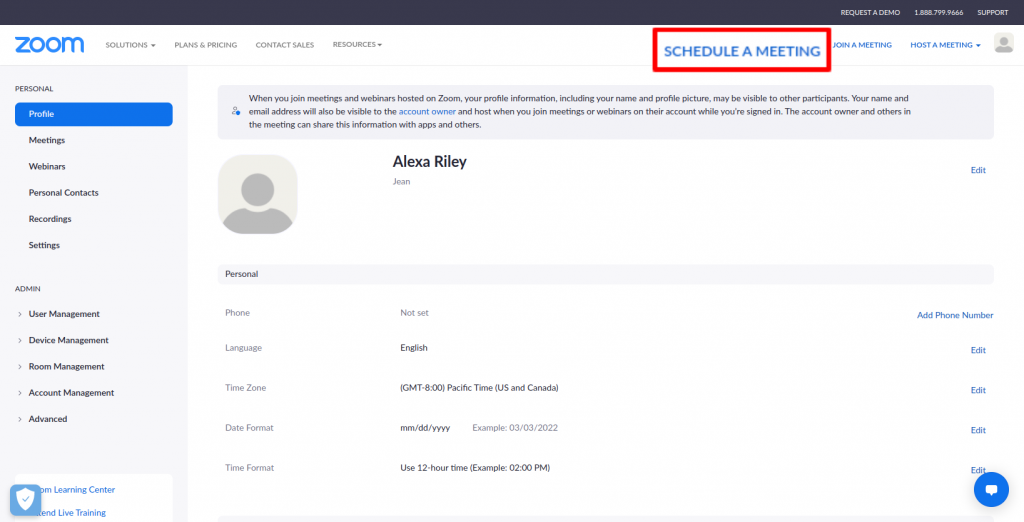
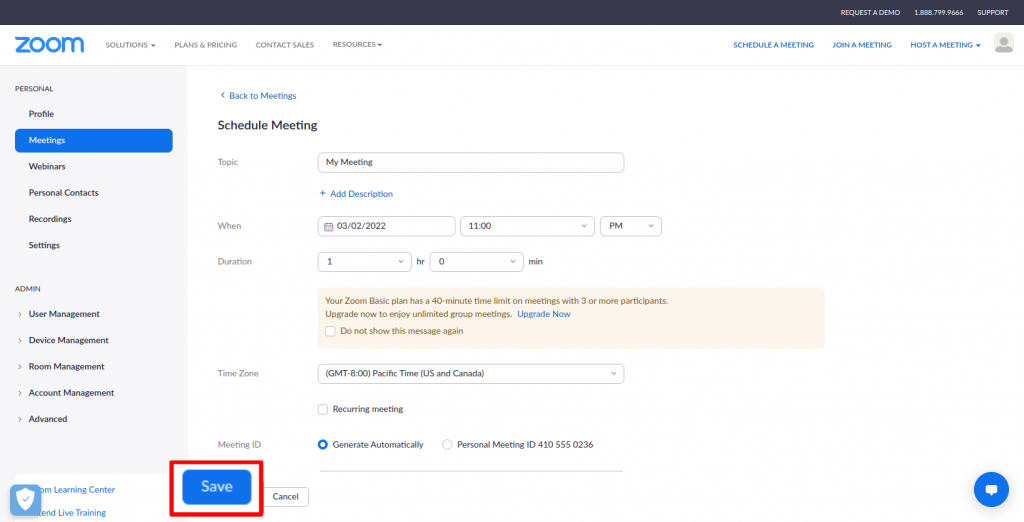
Step 1: Click on Schedule Meeting
Sign up/Sign in to Zoom and click on ''SCHEDULE A MEETING.'
Step 2: Save the Meeting
Enter the meeting details and click on 'Save.'
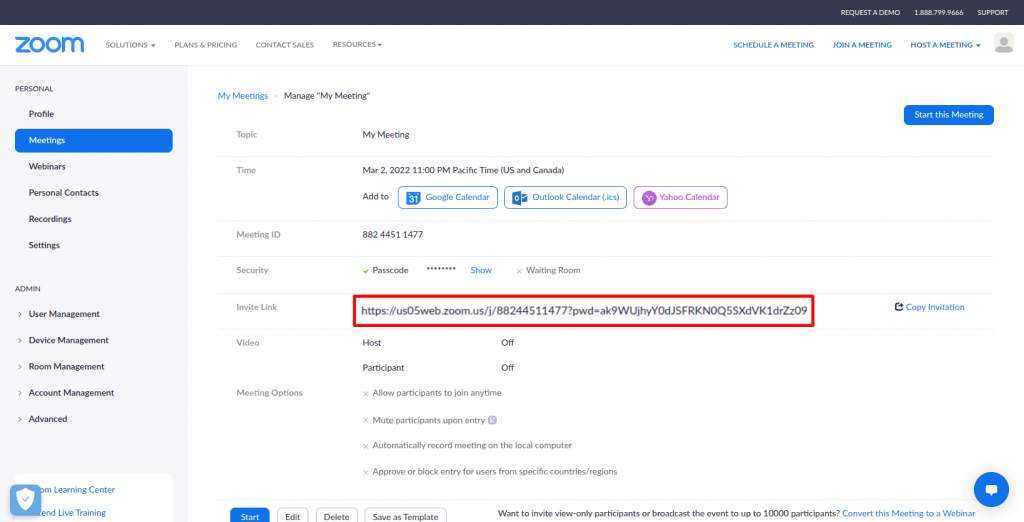
Step 3: Copy the Invite Link
Copy the Invite Link.
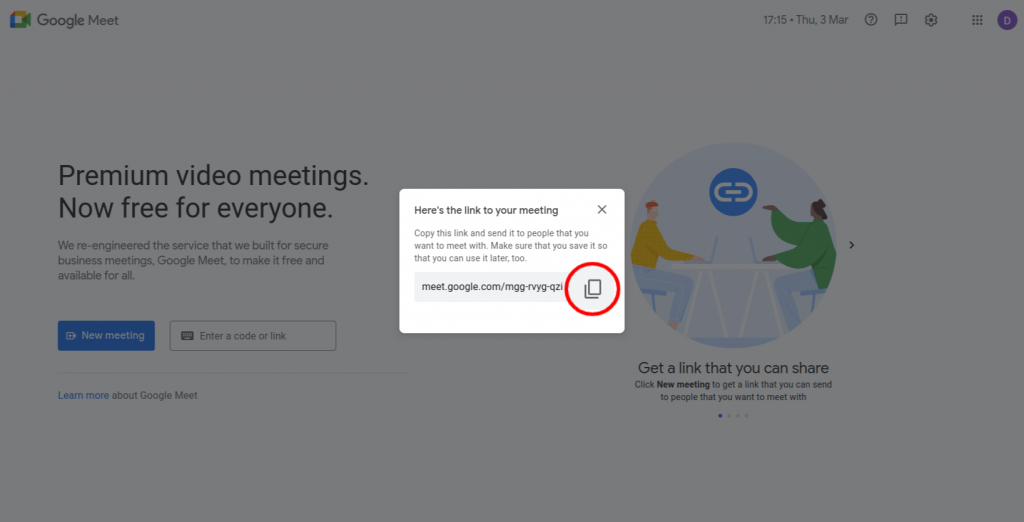
How to get a Google Meet URL to share?
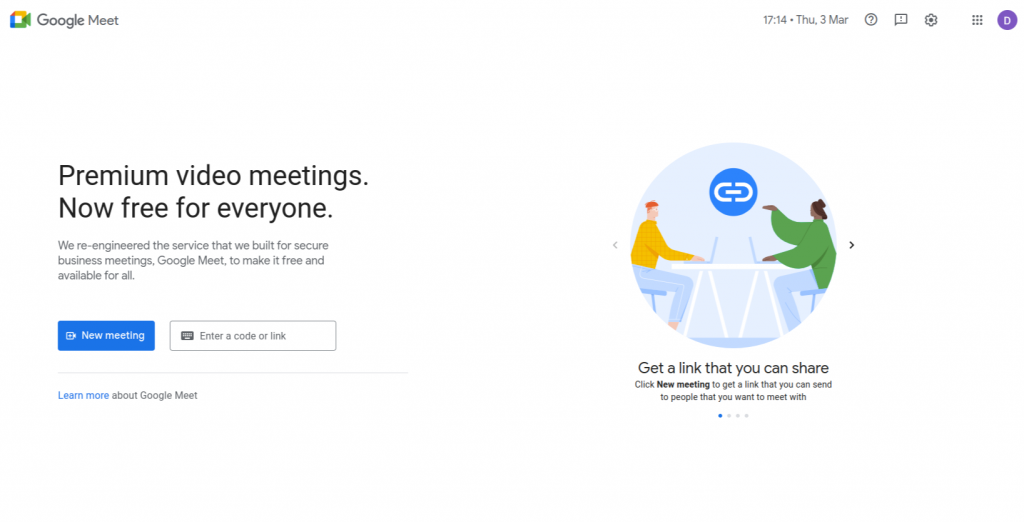
Step 1: Sign In to Google Meet
Sign in to your Gmail account and go to Google Meet.
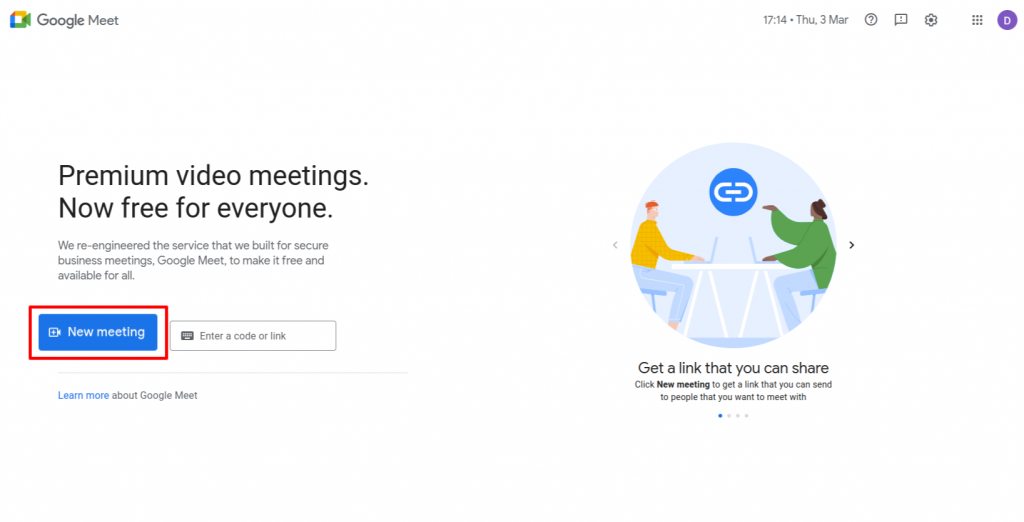
Step 2: Create New Meeting
Click on the 'New Meeting' button and select the suitable option.
Step 3: Copy the Meeting Link
Click on the 'Copy' icon of the meeting link.
Which meeting platforms does QRCodeChimp's meeting QR code generator support?
You can use the Meeting QR Code Generator with meeting links from Zoom, Google Meet, Microsoft Teams, Webex, GoTo Meeting, and other online meeting platforms.
Simply copy the meeting URL from your platform and paste it into the Meeting QR Code Generator.
Can I change the meeting URL after creating a meeting QR code?
If your meeting QR code is dynamic, you can change the meeting URL without reprinting the code. However, if your meeting QR code is static, you'll need to create a new QR code if the meeting URL changes.
How can users join an online meeting using a meeting QR code?
A meeting QR code enables users to join a meeting by simply scanning the meeting QR code. Upon scanning the code, they get redirected to the meeting, and they just need to click the 'Join' button.
Can I use this Meeting QR Code Generator for Zoom or Google Meet?
Yes. You can paste a Zoom or Google Meet link directly into the Meeting QR Code Generator.
QRCodeChimp also provides dedicated Zoom Meeting QR Code Generator and Google Meet QR Code Generator solutions for users looking for platform-specific guidance.
Can I create a QR code for a Microsoft Teams meeting?
Yes. Copy your Microsoft Teams meeting link and paste it into the Meeting QR Code Generator. Participants can scan the resulting QR code to open the Teams meeting link.
Any Microsoft Teams authentication or meeting access requirements continue to apply.
Can I change the meeting URL after creating a meeting QR code?
Yes, if your Meeting QR Code is dynamic. You can change the meeting URL without reprinting the QR code.
If you create a static QR code, the destination cannot be changed, so you will need to create a new QR code if the meeting URL changes.
Should I create a static or dynamic Meeting QR Code?
Use a static QR code if the meeting URL will not change and you do not need scan analytics.
Use a dynamic QR code if you want to update the meeting URL later or track QR code scans.
Does scanning a Meeting QR Code automatically admit someone to the meeting?
No. Scanning the QR code opens the meeting link.
Any controls configured by the meeting organizer or platform, such as sign-in requirements, passcodes, waiting rooms, or host approval, still apply.
Can Meeting QR Code analytics track attendance?
No. Meeting QR Code analytics track QR code scans, not confirmed meeting attendance.
A scan indicates that someone accessed the meeting link through the QR code. Use the meeting platform's attendance or participant records to check actual attendance.
Hear What Our Customers Have to Say!